AXISDESK
Getting set up
Sierra Chart · live CME data

Sierra Chart with live CME data, step by step

From a new Sierra Chart account to live NQ data at the cheap non-professional rate. The cheap rate needs a funded broker account, so this walks through opening one with Stage 5 Trading too. Plan on about a week end to end: most of it is waiting for the broker.

Time~1 hour of your time, 2–5 days of waiting Monthlyabout $43–70, depending on package and data Up front$100 deposit (stays your money)

What it costs

Prices from Sierra Chart's own pages, checked 5 Oct 2026. Sierra changes them occasionally, so the links at each step are the final word.

ItemPriceNotes
Sierra Chart Package 11 · Integrated Advanced$46 / month
$29.90 / mo on 12-month prepay
The minimum for the AXIS charts: it includes Numbers Bars (footprints) and the TPO Chart.
Sierra Chart Package 12 · Integrated Advanced MBO$56 / month
$36.40 / mo on 12-month prepay
Package 11 plus Market by Order data. Optional (see step 2).
CME data, non-professional, with market depth$13.50 / monthCovers NQ, ES, MNQ, MES. Needs the funded broker account.
Full CME Group with market depth (CME, CBOT, NYMEX, COMEX)$40.50 / monthOnly if you also trade YM, CL or Gold.
Stage 5 Trading account$100 depositA real futures account. The money stays yours. This is what unlocks the non-professional data rate.
Teton order routing (Sierra ↔ Stage 5)$0No monthly or per-contract fee. Broker commissions and exchange fees apply only if you trade the account.
Without a funded account: CME professional rate$145 / monthWhat you'd pay instead. This is why step 3 exists.

Typical total: Package 11 on a 12-month prepay ($29.90) + CME with depth ($13.50) ≈ $43.40 a month, plus the one-time $100 that stays in your Stage 5 account.

STEP 1

Create your Sierra Chart account and install it

  1. Go to sierrachart.com → Create an Account and sign up. Your Account Name (username) matters later. Write it down.
  2. Download Sierra Chart from the Software Download page and install it.
  3. Open Sierra Chart and log in with the same Account Name and password.
  4. To find your Account Name at any time: Help → About.
  5. Check for updates. Click Help → Download Current Version. If a newer version is available, follow the prompts to install it and let Sierra restart. Do this now, and again whenever we tell you there's an update.

Stay on the current version. The AXIS studies are built for current Sierra Chart. An old version can stop them loading, so check for updates before you report a problem.

You'll give your Account Name (never your password) to Stage 5 in step 3. That's how they link your broker account to Sierra.

IllustrationHelp → About shows the Account Name Stage 5 needs.
IllustrationHelp → Download Current Version checks for a newer Sierra Chart and installs it.
STEP 2

Choose a package: 11 or 12

Both are "Integrated" packages, meaning they work with Sierra's own data feed and Teton order routing. The only difference is one feature:

Package 11Package 12
Footprints (Numbers Bars), TPO charts, market-depth history✔✔
All AXIS studies and chart setups✔✔
Market by Order (MBO): individual orders in the book, your place in the queue—✔
Price$46 · $29.90 prepaid$56 · $36.40 prepaid
  1. Start with Package 11. It runs every AXIS study and both chart guides. Take 12 only if you want MBO tools on the DOM; you can upgrade any time.
  2. Buy it from your Account Control Panel. The 12-month prepay is about 35% cheaper per month.

Heads up: changing packages later can reset your exchange agreements and data activation to "To do". If you switch, redo steps 4 and 5.

Sierra Chart's package page: Package 11 at 46 USD a month with TPO Chart Study, Numbers Bars, Numbers Bars Calculated Values, Market Depth Historical Graph; Package 12 at 56 USD a month adding Market by Order
Real screenshotFrom Sierra Chart's package page. Package 12 is Package 11 plus Market by Order.
STEP 3

Open a Stage 5 Trading account

CME only gives the cheap non-professional data rate to people with a real, funded futures account. Prop-firm and evaluation accounts (Topstep, Apex, Lucid and the like) do not count. Stage 5 is the broker Sierra itself recommends for this, with the lowest minimum.

  1. Fill in the form at stage5trading.com/open-an-account. For platform, choose Sierra Chart.
  2. Confirm the registration email, then complete the account application. A rep contacts you within about 24 hours.
  3. Sign the Stage 5 risk disclosure. It arrives as an e-signature email from GFF Brokers (Stage 5's parent company).
  4. Fund the account with at least $100.
  5. Tell your rep: "I want Teton order routing with Sierra Chart. My Sierra Chart Account Name is ____." They link it on their side. Never send your password.

Ours clears through Dorman Trading; you'll get a "Stage 5/Dorman open notice" email when the account is live. Approval took us a few days.
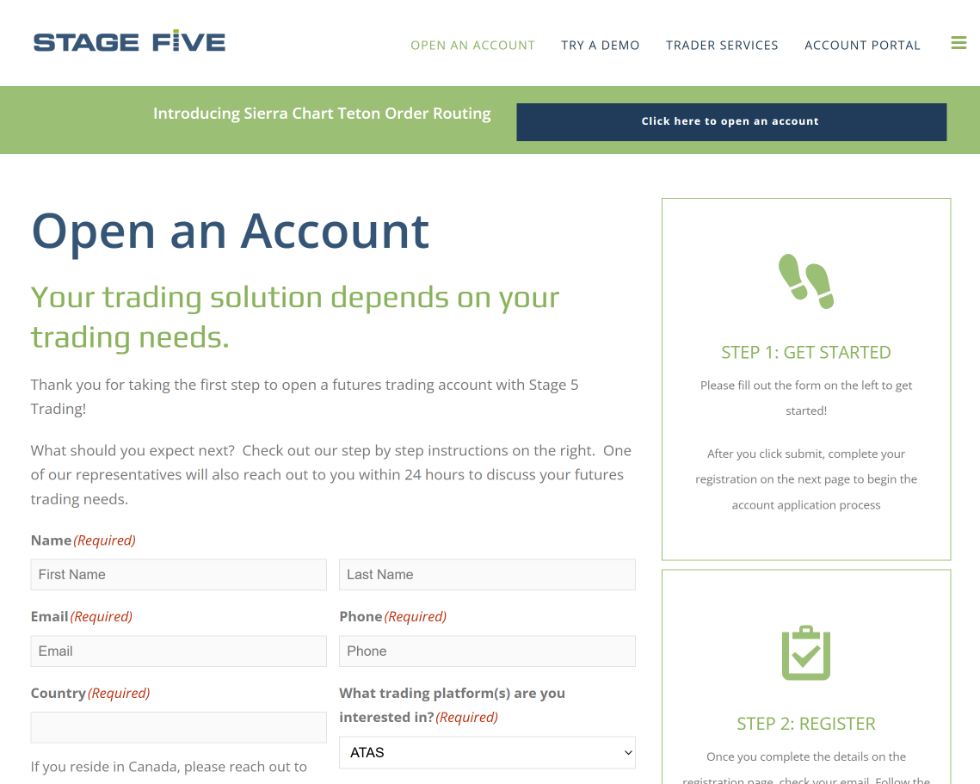
Stage 5 Trading's Open an Account page with name, email, phone, country and trading platform fields, and Step 1 Get Started on the right
Real screenshotStage 5's sign-up form. Step 1 of their 3 (get started, register, complete the application).
STEP 4

Sign the CME agreements as a non-professional

  1. In your Sierra Account Control Panel open CME / CBOT / NYMEX / COMEX Exchange Agreements.
  2. Complete and e-sign the Uniform Market Data Subscriber Agreement.
  3. Complete and e-sign the CME Non-Professional Certification.
  4. Answer every question honestly. "Non-professional" means you trade your own money and aren't registered or employed in the securities or futures industry (roughly; the certification spells out the exact test).

The trap we hit: signing these while the only account you have is a prop or eval account gets you flagged professional ($145/month). Have the Stage 5 account open first. If you're already flagged, open a Sierra support ticket and ask them to reset the agreements.

IllustrationThe two agreements to sign. The real page is a plain Sierra web page with more text around these.
STEP 5

Activate the CME data

  1. Open Activate / Deactivate Denali Exchange Data Feed Exchanges.
  2. Activate CME with Market Depth for non-professional Trading accounts: $13.50/month, covers NQ and ES (and the micros).
  3. Want YM, CL or Gold too? Take Full CME Group with Market Depth ($40.50) instead.
  4. Don't activate stock feeds (US Equities, NASDAQ TotalView) by mistake. They're separate monthly fees you don't need for futures.

The orange (!) in the "Trading Account Required" column means the rate only works once Sierra sees your verified Stage 5 account. Until then you'll get delayed data even though you're paying. That's normal, and it fixes itself in step 6.

Sierra Chart's Denali exchange fee table: Full CME Group with Market Depth non-professional 40.50, Full CME Group non-professional 6.00, CME top-of-book 2.00, CME with Market Depth non-professional 13.50, CME professional 145.00, CME E-mini professional 78.00
Real screenshotFrom Sierra's Denali data feed page. The row to activate for NQ is CME with Market Depth for non-professional Trading accounts.
STEP 6

Connect Sierra to Stage 5 (Teton)

  1. Update Sierra first: Help → Download Current Version.
  2. Open Global Settings → Data/Trade Service Settings.
  3. Set Current Selected Service to Teton CME Order Routing and press the A button next to it.
  4. Set Clearing Firm to Stage 5's entry. If there's more than one, ask your rep which clearing firm your account is with.
  5. Press OK, then File → Connect to Data Feed.

"Trade account not assigned" (or "No trade accounts assigned") means Stage 5 hasn't finished linking your account. Use File → Disconnect, give them a day, and connect again. Nothing is wrong on your side.

IllustrationThe two settings that matter, plus the A (accept) button. The real dialog has many more rows; leave those as they are.
STEP 7

Check you're on live data

  1. Open an NQ chart: File → Find Symbol → Futures → NQ.
  2. Look at Sierra's title bar. Live shows Teton CME Routing with no Delayed. If it says Delayed, steps 3–5 aren't finished.
  3. Watch the last price against another live source for a minute. Delayed data runs about 10 minutes behind.
  4. Using existing chartbooks from someone else? Open them and run Edit → Translate Symbols to Current Service so their symbols match Sierra's feed.
  5. For real orders, make sure Trade → Trade Simulation Mode On is off.

Optional, for order-flow work: to save the order book for replay, turn on Record Market Depth Data for your symbol in Global Settings → Symbol Settings, then reconnect.

IllustrationWhat to look for in the title bar.

Contacts

Kevin McGeeCustomer Relations Manager, Stage 5 Trading. Set up our account. 📞 312-741-1328✉ km@s5trading.com
Stage 5 TradingA division of Global Futures & Forex (GFF Brokers) Toll free 1-800-258-6675Phone +1-312-896-9897Order desk +1-312-899-5054 ✉ client-services@s5trading.com 5755 Las Virgenes Road, Suite C, Calabasas, CA 91302 stage5trading.com/contact
Sierra Chart supportAccount, package and data questions Open an Account Support Ticket from your Account Control Panel Teton setup docs The CME funded-account rule

Tip: email links may not open from inside this page, so copy the address if a click does nothing.

Traps we hit, so you don't